No, not every squeegee is suitable for every screen printing job. While almost any rubber blade can move ink across a screen, choosing the wrong squeegee can lead to uneven ink deposits, blurry edges, missing details, and inconsistent print quality.
A screen printing squeegee may look like a simple strip of rubber, but its hardness, blade shape, material, and size all affect how ink passes through the mesh and transfers onto the printing surface.
For example, the squeegee you use to print a large design on a cotton T-shirt may not be the best choice for printing fine details on a PCB or a smooth glass panel.
Understanding these differences can help you achieve more consistent results, reduce material waste, and avoid unnecessary adjustments during production.
In this guide, we'll explain how screen printing squeegees work, what specifications matter, and how to select the right blade for different printing applications.
Screen printing is a stencil-based printing process. Ink is placed on a mesh screen, and a squeegee moves across the stencil to transfer ink through the open mesh areas onto the substrate.
During printing, the squeegee performs several important functions:
Controls ink transfer: Applies pressure to move ink through the stencil openings.
Creates contact: Helps bring the screen into contact with the printing surface along the printing line.
Controls ink deposit: Influences how much ink is transferred and how evenly it is distributed.
Maintains print definition: A consistent blade edge helps produce clean lines and repeatable results.
The squeegee works together with the screen mesh, stencil thickness, ink properties, screen tension, and printing equipment.
If the squeegee is too soft, it may bend excessively under pressure, changing the effective printing angle and creating an uneven ink deposit.
If the squeegee is too hard for the application, it may not conform sufficiently to an uneven substrate. Excessive pressure can also increase screen wear.
A worn or damaged blade edge can produce streaks, missing ink, or inconsistent print edges.
This is why choosing the right squeegee is not simply about finding a blade that can push ink. It is about achieving controlled, repeatable ink transfer.
Before purchasing or replacing a squeegee, consider four main specifications: hardness, blade edge shape, material, and size.
Squeegee hardness is measured using the Shore A scale, which describes how resistant a flexible material is to indentation.
A lower Shore A number indicates a softer blade, while a higher number indicates a harder blade.
Different hardness levels influence blade flexibility, ink deposit, and printing precision.
| Squeegee Hardness | Characteristics | Typical Applications |
|---|---|---|
| 60–65 Shore A | Soft, flexible, generally allows heavier ink deposits | Rough textiles, uneven surfaces, heavy ink coverage |
| 70–75 Shore A | Balanced flexibility and edge stability | General textile printing, everyday production, many multicolor jobs |
| 80–90 Shore A | Stiffer blade, resists bending under pressure | Fine details, high-mesh printing, selected precision applications |
These are general starting points rather than fixed rules. Actual performance depends on blade formulation, ink, screen mesh, angle, and printing pressure.
Soft squeegees (60–65 Shore A)
Softer blades bend more easily and can conform to some uneven surfaces.
They are often considered when printing on textured materials or when a relatively heavy ink deposit is required.
However, excessive blade deflection can reduce control over fine lines and small details.
Medium-hardness squeegees (70–75 Shore A)
Medium-hardness blades provide a balance between flexibility and stability.
They are commonly used for general-purpose screen printing, especially on textiles.
For many standard printing jobs, a 70 Shore A blade is a practical starting point for testing.
Hard squeegees (80–90 Shore A)
Harder blades resist bending and can help maintain a more consistent printing edge.
They are often selected for fine details, high-resolution patterns, and applications requiring controlled ink deposits.
However, using an excessively hard blade with unsuitable pressure or an uneven substrate can create printing problems.
Practical tip: If you are unsure which hardness to choose, begin with a medium-hardness blade and compare print results before moving to a softer or harder option.
The shape of the squeegee edge also influences how ink is transferred through the screen.
Three common blade profiles are square, beveled, and rounded.
Square Edge Squeegee
A square-edge squeegee has a straight, flat-bottomed edge with defined corners.
It is one of the most widely used blade profiles in screen printing.
Typical applications include:
General textile screen printing
Large solid-color designs
Flat substrate printing
Standard manual and automatic printing
A properly maintained square edge can also produce excellent detail when matched with suitable mesh, ink, and printing settings.
Beveled Edge Squeegee
A beveled-edge squeegee has an angled blade profile.
Depending on the bevel design and printing setup, it may be used for applications requiring a particular contact geometry, including certain container and specialty printing processes.
The exact bevel angle and blade configuration should be selected according to the equipment and substrate.
Rounded Edge Squeegee
A rounded-edge squeegee has a curved contact edge.
It is often used in applications where a heavier ink deposit or particular printing effect is required.
Rounded profiles may be useful for selected specialty printing jobs, but they are generally not the first choice when maximum fine-detail definition is required.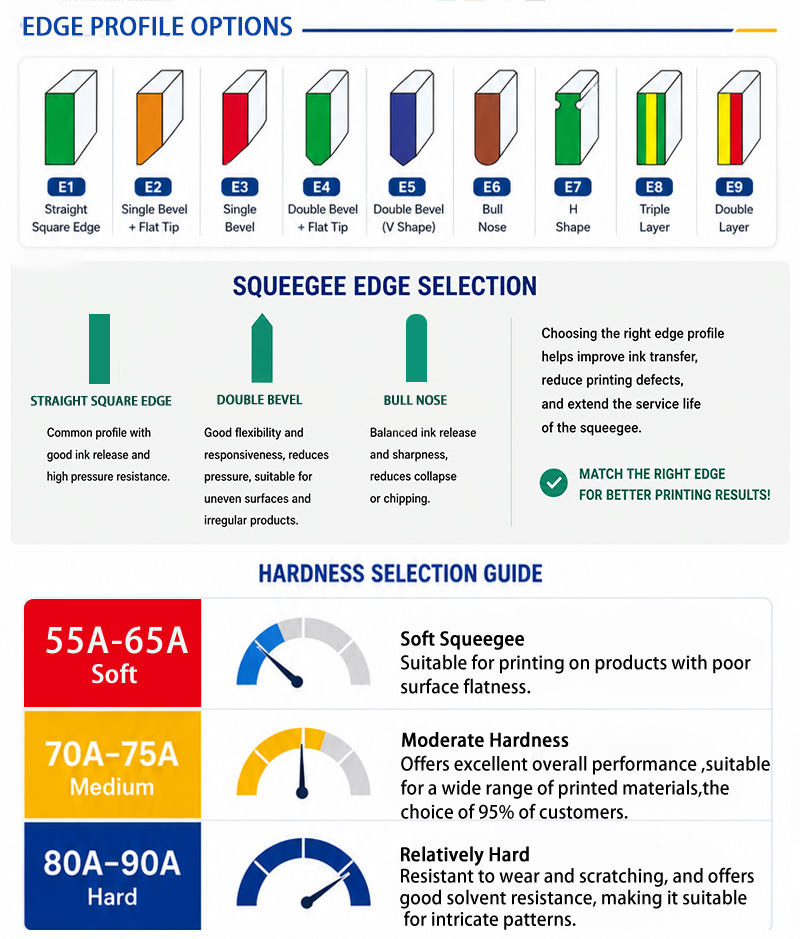
Which blade shape should you choose?
For most general flat-surface printing applications, a square-edge squeegee is a sensible starting point.
Beveled and rounded profiles should be considered when the substrate, ink deposit requirements, or printing equipment calls for a different contact geometry.
Squeegees can be manufactured from different elastomer materials, but polyurethane (PU) is widely used in modern screen printing.
Polyurethane Squeegees
Polyurethane squeegees are popular because they can provide:
Good abrasion resistance
Consistent blade hardness
Stable printing edges
Good durability during repeated printing
Chemical resistance when the correct formulation is selected
They are widely used in textile printing, industrial screen printing, electronics, and other applications.
However, not all polyurethane formulations have the same resistance to solvents or cleaning chemicals.
The specific ink system and cleaning solution should always be checked against the manufacturer's material recommendations.
Natural Rubber Squeegees
Natural rubber blades can offer good flexibility and may be suitable for certain applications.
However, their resistance to abrasion, solvents, and long-term deformation may differ from that of purpose-designed polyurethane blades.
For production environments requiring repeatable print quality, selecting a suitable blade formulation is often more important than choosing solely by material price.
Even when the hardness and material are correct, an incorrectly sized or installed squeegee can affect printing results.
Squeegee Width
The squeegee should generally be wider than the printed image to ensure complete coverage.
For many applications, allowing approximately 2–5 cm of additional blade width on each side of the design is a useful starting point, provided the screen and equipment allow it.
Avoid choosing a blade that extends unnecessarily close to the screen frame, as this may interfere with printing and screen deflection.
Squeegee Thickness
Blade thickness affects stiffness and how the blade responds to pressure.
A thicker blade may resist bending more than a thinner blade of the same material and hardness.
Common squeegee thicknesses include 5 mm, 7 mm, and 9 mm, although available sizes vary by manufacturer.
Correct Installation
When installing the squeegee:
Make sure the blade is held securely in the handle or machine holder.
Check that the printing edge is straight and undamaged.
Ensure the blade extends evenly from the holder.
Avoid excessive unsupported blade height.
Confirm that the holder is aligned correctly with the screen.
A poorly installed blade can create uneven pressure across the print area, even when the squeegee itself is in good condition.
Squeegee specifications should never be considered in isolation.
The best choice depends on the printing surface, mesh count, ink characteristics, and printing equipment.
Different printing surfaces require different levels of blade flexibility and control.
Rough or Textured Surfaces
Examples include textured fabrics, canvas, and selected uneven materials.
A softer blade may help maintain more consistent contact when printing on these surfaces.
For some jobs, a 60–70 Shore A blade is a useful starting point.
Smooth Surfaces
Examples include glass, smooth plastic, coated metal, and certain electronic substrates.
These applications may benefit from a firmer blade when precise ink transfer and fine-detail control are required.
A 70–80 Shore A blade, or a harder specialty blade where appropriate, may be considered.
However, surface smoothness alone does not determine the correct hardness. Ink properties and stencil requirements are equally important.
Mesh count refers to the number of threads per unit length in a screen printing mesh.
Lower mesh counts generally have larger openings, while higher mesh counts have smaller openings, although thread diameter also affects the actual opening size.
Lower Mesh Count
Lower mesh counts are often used for heavier ink deposits, larger printed areas, and inks containing relatively large particles.
Depending on the ink and desired deposit, a softer or medium-hardness blade may be suitable.
Higher Mesh Count
Higher mesh counts are often selected for fine details, thin ink deposits, and high-resolution printing.
A medium-hard or harder squeegee can help maintain a stable printing edge and controlled ink transfer.
However, a harder blade is not automatically better for every high-mesh application.
Mesh opening size, stencil thickness, ink rheology, and printing pressure must also be considered.
Different inks behave differently during printing.
Water-Based Inks
Water-based inks vary significantly in viscosity and formulation.
A medium-hardness squeegee is often a practical starting point, but the final selection should depend on the ink's flow behavior and the required print deposit.
Plastisol Inks
Plastisol inks are widely used in textile screen printing.
A 70 Shore A blade is a common starting point for many standard plastisol applications.
For heavy deposits, specialty effects, or fine-detail work, different hardness levels may be more suitable.
UV and Solvent-Based Inks
UV and solvent-based inks may require squeegees with appropriate chemical resistance.
Some ink and cleaning systems can cause blade swelling, softening, or deterioration over time.
Important: Hardness alone does not guarantee solvent resistance. Always consider the polyurethane formulation and its compatibility with the chemicals used.
Printing equipment also influences squeegee selection.
Manual Screen Printing
In manual printing, the operator controls the printing angle, pressure, and stroke speed.
Because these conditions can vary between strokes, a medium-hardness blade is often a practical choice.
Softer blades may be useful for specific textured surfaces or heavier ink deposits.
Automatic Screen Printing
Automatic presses provide more repeatable control over stroke speed, angle, and pressure.
A firmer blade may be useful for high-speed printing and fine-detail applications where edge stability is important.
However, automatic printing does not always require a harder squeegee. The correct selection still depends on the substrate, ink, and desired printing result.
Squeegee hardness and blade geometry also influence the amount of ink deposited.
A softer blade generally bends more under pressure and may produce a heavier ink deposit.
A harder blade generally maintains a more stable edge and may help achieve a thinner, more controlled deposit.
For large solid-color areas, heavier ink coverage may be desirable.
For fine lines, small text, and halftone patterns, excessive ink deposits can reduce image definition.
The goal is not simply to transfer more ink, but to transfer the correct amount consistently.
The following table provides general starting points for common screen printing applications.
| Printing Application | Suggested Starting Point | Main Consideration |
|---|---|---|
| Cotton T-shirt printing | 70 Shore A, square edge | Balanced ink deposit and print definition |
| Textured fabric or canvas | 60–70 Shore A | Surface contact and ink coverage |
| Large solid-color designs | 60–70 Shore A | Heavier, more even ink deposit |
| Fine lines and halftones | 70–80 Shore A | Edge stability and detail control |
| High-mesh printing | 70–80 Shore A | Controlled ink transfer |
| UV or solvent-based printing | Chemically compatible PU blade | Resistance to ink and cleaning chemicals |
| High-speed automatic printing | 70–80 Shore A | Repeatability and wear resistance |
These recommendations are initial selection ranges, not universal specifications. Trial printing is necessary to confirm the best combination.
When print quality becomes inconsistent, the squeegee should be one of the first components checked.
Possible squeegee-related causes include:
Blade too soft for the printing conditions
Excessive printing pressure
Worn or rounded printing edge
Incorrect squeegee angle
Try checking the blade condition and reducing unnecessary pressure before changing multiple settings.
Uneven ink coverage may result from:
Inconsistent blade hardness
Uneven blade installation
Excessive blade bending
Damaged or irregular blade edges
Check that the blade is straight and that the holder applies consistent pressure across the printing width.
Possible causes include:
Insufficient printing pressure
Poor blade contact
Unsuitable blade angle
Incompatible ink and mesh combination
However, incomplete coverage can also result from stencil problems, screen tension, or ink viscosity.
Avoid assuming that every printing defect is caused by the squeegee.
Streaks may appear when the blade edge contains small nicks, cuts, or worn areas.
Inspect the printing edge under good lighting.
If damage is visible, the blade may need professional sharpening or replacement.
Rather than selecting a blade based only on its specifications, compare performance using your actual printing conditions.
A simple test procedure can help.
Step 1: Choose a starting hardness
Begin with a commonly used blade, such as 70 Shore A, if it is suitable for the application.
Step 2: Keep other conditions consistent
Use the same screen, ink, substrate, printing speed, and starting pressure settings.
Step 3: Print several test samples
Evaluate the results rather than relying on a single impression.
Step 4: Check the important details
Look for:
Edge sharpness
Solid-area coverage
Fine-line reproduction
Ink deposit consistency
Visible streaks or missing areas
Step 5: Compare another hardness
Test a softer or harder blade while keeping other variables as consistent as possible.
Step 6: Record the results
Keep a record of the squeegee hardness, blade profile, mesh specification, ink type, and printing settings.
These records can make future production setup faster and more consistent.
Even a correctly selected squeegee can produce poor results if it is not properly maintained.
Remove ink residue promptly using a cleaning method compatible with the blade material.
Avoid prolonged exposure to aggressive cleaning chemicals unless the blade is designed to withstand them.
Regularly check for:
Rounded edges
Cuts or nicks
Uneven wear
Swelling or deformation
Changes in blade flexibility
Some squeegees can be sharpened using suitable grinding equipment.
The edge must remain straight and consistent across the blade width.
Replace blades that are severely damaged, chemically degraded, or no longer capable of producing a uniform printing edge.
Store cleaned blades in a dry environment away from direct sunlight and excessive heat.
Avoid leaving them compressed, bent, or exposed to solvents for long periods.
Proper maintenance can help extend blade service life and maintain more consistent printing performance.
Not every rubber squeegee is suitable for screen printing. The blade must have appropriate hardness, chemical compatibility, edge geometry, and dimensions to provide controlled ink transfer. General-purpose rubber tools may not offer the consistency required for printing.
A 70 Shore A squeegee is a common starting point for general T-shirt printing. Softer blades may be useful for textured fabrics or heavier ink deposits, while harder blades may be considered for fine details and controlled ink transfer.
Not necessarily. A harder blade can help maintain edge stability, but print quality also depends on mesh count, stencil quality, ink viscosity, screen tension, and printing pressure. Excessive hardness or pressure can create new problems.
Possibly, but only if the blade material is compatible with both ink systems and their cleaning chemicals. Different formulations may require different chemical resistance properties. Check the blade manufacturer's recommendations before switching inks.
The squeegee should generally extend beyond the printed image on both sides. Approximately 2–5 cm per side is a useful starting point for many applications, but the correct width depends on the screen dimensions, image area, and equipment.
There is no universal replacement schedule. Blade life depends on printing volume, ink chemistry, cleaning methods, and abrasion. Replace or sharpen the blade when wear, damage, swelling, or inconsistent print results indicate that it can no longer perform properly.
A square-edge blade is commonly used for general printing and controlled image definition. A rounded-edge blade is often selected for specialty applications requiring a heavier ink deposit or a different contact profile.
So, can you use any squeegee for screen printing?
The answer is no—not if you want reliable, consistent results.
A squeegee does more than move ink across a screen. Its hardness, blade edge, material, and dimensions all influence how ink transfers onto the substrate.
The right choice also depends on the printing surface, mesh count, ink characteristics, and equipment.
For general-purpose printing, a medium-hardness polyurethane squeegee is often a sensible starting point. However, specialized applications may require different hardness levels or blade profiles.
Instead of relying on one squeegee for every job, evaluate the printing requirements, compare test results, and maintain the blade properly.
A well-matched squeegee can help improve print consistency, reduce unnecessary adjustments, and support more efficient screen printing production.
